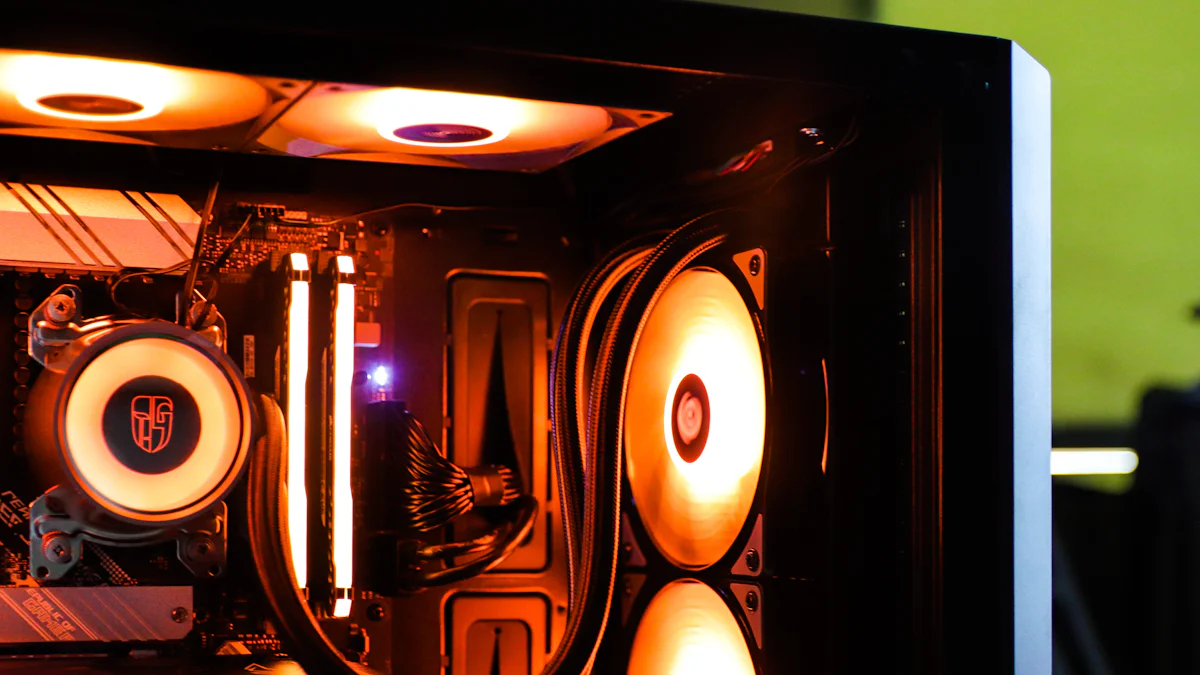
Cooling in PCs plays a crucial role in maintaining performance and longevity. Without proper cooling, components can overheat, leading to potential damage. Enter the world of liquid cooling—a game-changer in the realm of PC enthusiasts. Imagine your computer running like a sleek sports car, thanks to a liquid cooled PC system. This method not only enhances efficiency but also reduces noise, making it a popular choice among tech-savvy users. Liquid cooling is not just a trend; it’s a revolution in keeping your machine smooth and steady.
Liquid cooling uses liquid to transfer heat away from PC components. Imagine a river carrying away the heat like a superhero saving your computer from meltdown. The system includes water blocks, pumps, and radiators. Each part works together to keep everything cool and efficient.
Liquid cooling has roots in industrial settings. Engineers needed to manage heat in large machines. The technology evolved and found its way into PCs. Enthusiasts embraced it for its efficiency and sleek design. Liquid cooling became a symbol of cutting-edge technology.
Heat transfer in liquid cooling relies on basic physics. The coolant absorbs heat from the components. The heat then moves through tubes to a radiator. Air cools the liquid as it passes through the radiator. This cycle repeats, keeping your PC running smoothly.
A liquid cooling system includes several key parts:
Water Blocks: These attach to components like the CPU. They absorb heat directly.
Pumps: Pumps circulate the coolant through the system. They ensure constant movement.
Radiators: Radiators dissipate the heat into the air. Fans often assist in this process.
Liquid cooling systems use advanced materials and designs. These innovations enhance efficiency and reliability. Future trends may include smart monitoring and compact designs. Liquid cooling continues to evolve, offering exciting possibilities for PC enthusiasts.

Liquid cooling acts like a superhero for your PC. The system absorbs heat more effectively than air cooling. Imagine your PC running a marathon. Liquid cooling keeps it cool and collected. The coolant flows over components, whisking away heat like a refreshing breeze. Air cooling struggles when heat density rises. Liquid cooling handles higher heat densities with ease. Your PC stays in peak condition.
Air cooling often sounds like a jet engine. Fans whir and buzz, creating a noisy environment. Liquid cooling offers a quieter experience. Pumps and radiators work silently in the background. Your workspace feels like a peaceful library. Enjoy gaming or working without distractions. Liquid cooling provides serenity and efficiency.
Liquid cooling requires an initial investment. Components like pumps and radiators cost more than fans. Think of it as buying a luxury car. The upfront cost is higher, but the performance is worth every penny. Enthusiasts see it as a valuable upgrade.
Liquid cooling saves money over time. Efficient heat management leads to longer component life. Fewer replacements mean fewer expenses. Energy consumption decreases with lower temperatures. Your wallet stays happy while your PC performs at its best. Liquid cooling proves to be a wise investment for the future.

Radiators act as the lungs of your liquid cooled PC system. These components breathe life into your setup by dissipating heat. Radiators use fans to cool the liquid flowing through them. This process ensures that your PC remains at optimal temperatures. Radiators come in various sizes and designs. Enthusiasts often choose radiators based on their cooling needs and aesthetic preferences. Larger radiators offer better cooling performance. Smaller ones fit snugly into compact builds.
Pumps serve as the heart of your liquid cooled PC system. These devices keep the coolant circulating, ensuring consistent heat transfer. Without pumps, the liquid would stagnate, leading to overheating. Pumps vary in power and efficiency. Some models offer adjustable speeds for customized cooling. Others provide silent operation for noise-sensitive environments. Choosing the right pump ensures your system runs smoothly and efficiently.
Coolant acts as the lifeblood of your liquid cooled PC system. This liquid absorbs heat from components and carries it away. Coolants come in different colors and formulations. Some offer anti-corrosive properties to protect your system. Others provide vibrant hues for a visually striking setup. Regular maintenance of coolant levels keeps your system performing at its best. Changing the coolant every 12 months prevents particulate build-up and maintains thermal performance.
Reservoirs add flair and functionality to your liquid cooled PC system. These containers store extra coolant, allowing for easier maintenance. Reservoirs also enhance the visual appeal of your setup. Many enthusiasts choose reservoirs with transparent designs. These designs showcase the coolant's color and movement. Reservoirs simplify the process of filling and draining the system. This makes them a popular choice for those who enjoy tinkering with their PCs.
Temperature sensors offer peace of mind for your liquid cooled PC system. These devices monitor the temperature of your components in real-time. Sensors alert you to potential overheating issues before they cause damage. Many sensors integrate with software for easy monitoring. Some models display temperatures directly on the PC case. Temperature sensors ensure your system remains within safe operating limits. This adds an extra layer of protection to your investment.
A liquid cooled PC system transforms your computer into a high-speed machine. Imagine pushing your CPU to its limits without fear. Liquid cooling allows you to overclock with confidence. The coolant absorbs heat like a sponge, keeping temperatures low. Your PC runs faster and smoother. The Advanced Solutions Division experienced this firsthand. They overclocked their CPUs and achieved faster processing speeds. Liquid cooling provides the performance boost every enthusiast dreams of.
Picture your PC handling intense gaming or heavy workloads. A liquid cooled PC system ensures stability during these demanding tasks. The coolant circulates efficiently, preventing overheating. Your components remain cool even under pressure. No more crashes or slowdowns. Liquid cooling keeps your system rock-solid. Enjoy seamless performance without interruptions. Your PC stays in peak condition, ready for any challenge.
A liquid cooled PC system offers endless customization possibilities. Choose from a variety of coolants with vibrant colors. Create a setup that reflects your personality. Enthusiasts love the ability to design unique systems. Add LED lights for extra flair. Your PC becomes a work of art. Liquid cooling transforms your machine into a visual masterpiece. Impress friends with a setup that stands out.
Imagine your PC as the centerpiece of your room. A liquid cooled PC system delivers stunning visual impact. Transparent reservoirs showcase the coolant's movement. Radiators and pumps add a sleek, futuristic look. Your setup becomes a conversation starter. Visitors marvel at the beauty and complexity. Liquid cooling turns your PC into a showpiece. Experience the joy of owning a system that combines performance with aesthetics.
Get ready for an exciting journey into the world of liquid cooling! First, gather the essential tools. A screwdriver will become your trusty sidekick. Pliers will help with those tricky bits. A tube cutter ensures precision when cutting tubing. A thermal paste applicator guarantees perfect contact between components. A microfiber cloth keeps everything clean and shiny. These tools transform you into a liquid cooling maestro.
Safety first! Unplug your PC to avoid any shocking surprises. Ground yourself to prevent static electricity from damaging components. Handle all parts with care. Avoid touching circuit boards with bare hands. Keep liquids away from electrical components. Double-check connections before powering up. Follow these precautions to ensure a smooth installation process.
The radiator becomes the star of the show. Choose a suitable location inside your case. Top or front mounting often works best. Secure the radiator using screws. Ensure a snug fit. Attach fans to the radiator for optimal airflow. Connect fan cables to the motherboard. The radiator now stands ready to cool your system.
Tubing acts as the lifeline of your liquid cooled PC system. Measure and cut tubing to the desired length. Connect one end to the water block on the CPU. Attach the other end to the radiator. Ensure a tight seal to prevent leaks. Repeat the process for additional components like the GPU. Use clamps to secure tubing in place. Double-check connections for stability. The tubing now forms a network of cooling magic.
Keeping your liquid cooled PC system in top shape requires regular attention. Think of it like caring for a prized race car. Regular maintenance ensures smooth performance and longevity.
Leaks can spell disaster for your PC. Regularly inspect connections and tubing. Look for any signs of moisture or discoloration. A small leak can lead to big problems. Use a flashlight to spot hidden leaks. Early detection saves you from costly repairs.
Coolant acts as the lifeblood of your system. Check levels frequently to ensure optimal performance. Low coolant levels can cause overheating. Top up with the recommended coolant type. Keep your system running smoothly with consistent checks.
Flushing removes debris and maintains efficiency. Drain the old coolant completely. Rinse the system with distilled water. This process clears out any build-up. Refill with fresh coolant for peak performance. Regular flushing keeps your liquid cooled PC system healthy.
Components wear out over time. Inspect pumps, radiators, and tubing for wear and tear. Replace parts showing signs of damage. Upgrading components enhances performance. New parts bring improved efficiency and reliability. Keep your system updated for the best results.
Liquid cooling often raises eyebrows with the fear of leaks. Imagine a tiny river running through your PC. Sounds risky, right? Fear not! Modern liquid cooling systems use high-quality seals and fittings. These components prevent leaks effectively. Regular checks ensure everything stays watertight. You can enjoy peace of mind knowing your PC remains safe and dry.
Many believe liquid cooling setup resembles rocket science. The truth is far from it. Manufacturers design kits with user-friendliness in mind. Clear instructions guide you step by step. You become a tech wizard in no time. The satisfaction of building your own system outweighs any initial doubts. Dive into the world of liquid cooling with confidence.
Every system faces hiccups now and then. Liquid cooling is no exception. Common issues include air bubbles and pump noise. Air bubbles disrupt coolant flow. Pumps sometimes hum louder than expected. Identifying these problems early prevents bigger headaches. Regular maintenance keeps your system running smoothly.
Solving liquid cooling issues feels like solving a puzzle. Air bubbles vanish with a gentle tilt of the case. This action allows trapped air to escape. Pump noise often reduces with proper mounting. Ensure the pump sits securely in place. Regularly check for loose connections. A little attention goes a long way in maintaining peak performance. Your liquid cooled PC system rewards you with quiet, efficient operation.
Liquid cooling transforms your PC into a powerhouse. Imagine your computer running like a high-speed train. Liquid cooling enhances performance by efficiently managing heat. Components stay cool, even under heavy loads. Overclocking becomes a breeze with liquid cooling. Your PC reaches new heights in speed and stability.
Investing in liquid cooling pays off over time. Picture a wise investment that keeps giving back. Liquid cooling extends the lifespan of your components. Fewer replacements mean more savings. Energy efficiency reduces electricity bills. Liquid cooling proves to be a smart choice for long-term value.
Liquid cooling suits various users. Gamers enjoy the performance boost. Creators appreciate the quiet operation. Tech enthusiasts love the customization options. Liquid cooling adapts to different needs and preferences. Everyone finds something to love in a liquid cooled system.
The future of liquid cooling looks bright. Imagine a world where PCs run cooler and quieter. Innovations continue to improve efficiency. Smart monitoring and compact designs are on the horizon. Liquid cooling leads the charge in revolutionizing technology. The journey promises exciting developments for all PC enthusiasts.
Liquid cooling transforms your PC into a powerhouse. Imagine your computer running like a high-speed train. Liquid cooling enhances performance by efficiently managing heat. Components stay cool, even under heavy loads. Overclocking becomes a breeze with liquid cooling. Your PC reaches new heights in speed and stability.
Investing in liquid cooling pays off over time. Picture a wise investment that keeps giving back. Liquid cooling extends the lifespan of your components. Fewer replacements mean more savings. Energy efficiency reduces electricity bills. Liquid cooling proves to be a smart choice for long-term value.
Brand Introduction: X-HON Fans
At X-HON Fans, we are a seasoned manufacturer with a focus on the production of cooling fans. Our products are widely recognized and utilized in a variety of industries, including lighting, wine cabinets, automotive cooling systems, welding machinery, and beyond. We specialize in the manufacturing of DC brushless fans, AC fans, dustproof guards, compact cooling fans, and industrial fans. We have achieved ISO9001 international quality system certification, and our products have been endorsed by certifications such as ROHS, TUV CE, FCC, SGS, and UL test reports. Our fans are integral to the operations of computers, communication devices, consumer electronics, automotive electronics, HVAC systems, and building automation.

We are committed to the production of high-performance cooling fans, providing both standard and tailored solutions to meet the specific needs of our clients. We offer sample testing to ensure that our products meet the highest standards of quality and reliability. Additionally, we are now pleased to provide IP68-rated waterproof fans across our entire product line, catering to the efficient and stable cooling requirements in complex environments.
Effective PC Cooling Solutions with Fans
The Importance of Fans for Optimal PC Performance
Creating a Calm Workspace with Silent Fans
